Run Cloud Servers and Apps Without the Complexity ⚡️
Connect your cloud servers and start deploying applications in minutes. No complex configurations, no steep learning curve – just fast and efficient server management.
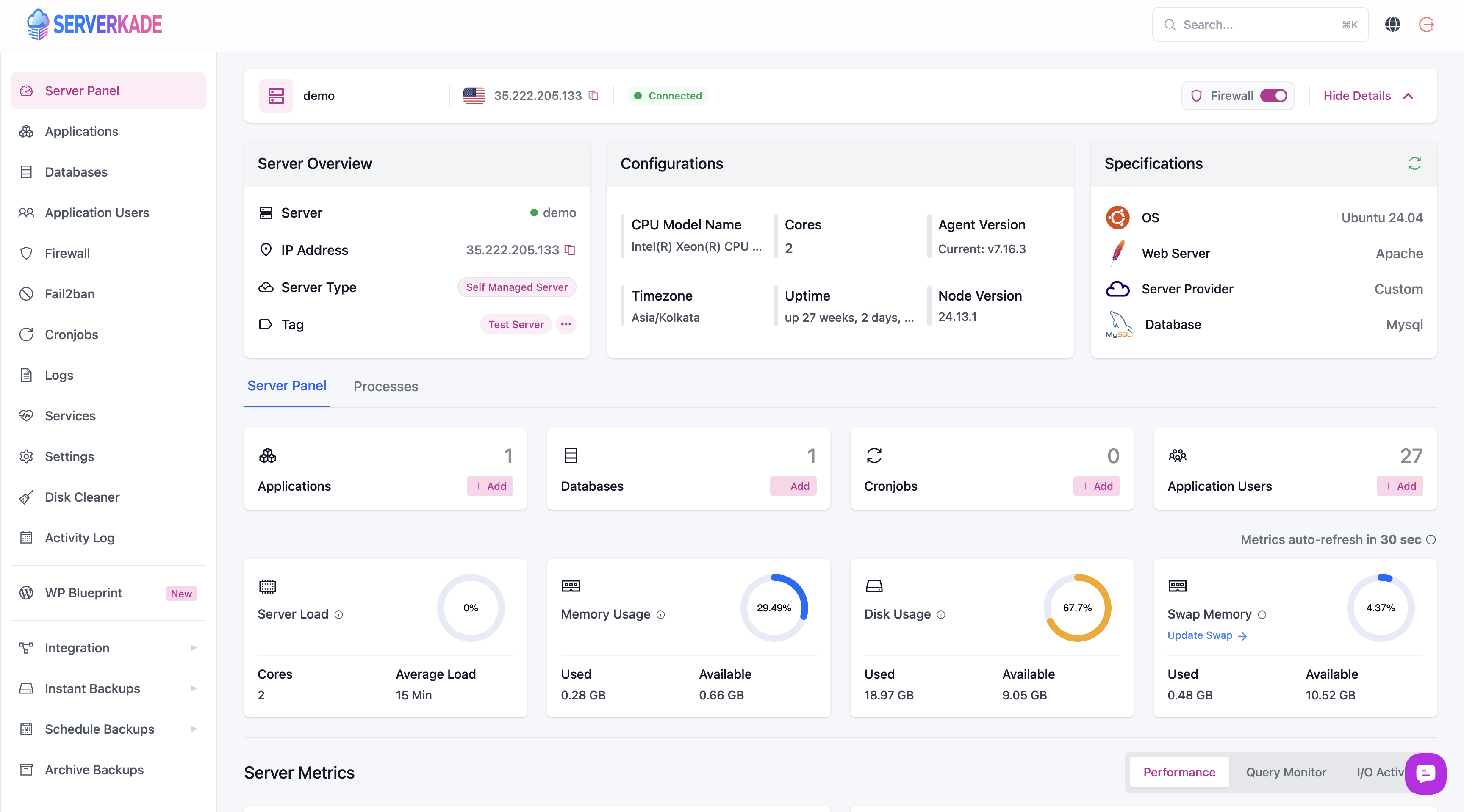
Bring your own server from DigitalOcean, Vultr, Linode, Hetzner, AWS, Google Cloud, Azure or any VPS provider and manage websites, databases, SSL, backups and deployments from a single dashboard.
Full Root Access
Full root access and complete control over your own server, with no lock-in and no custom packages.
Pay Providers Directly
Pay your infrastructure costs directly to your provider with no markup and no hidden fees.
Automated SSL & Backups
Automated SSL certificates, scheduled backups and ongoing server management, handled for you.
Any Cloud Provider
Connect a VPS from DigitalOcean, Vultr, Linode, Hetzner, AWS, Google Cloud, Azure or any provider.
One-Click Deployment
Deploy applications to your connected server in a single click, with tooling built for speed.
Optimised Tech Stacks
Optimised web servers, runtimes and databases configured out of the box on every server.
The complete modern cloud server control panel designed for the future
OpenLiteSpeed
Apache
Nginx
OpenLiteSpeed
Apache
Nginx
OpenLiteSpeed
Apache
Nginx
MySQL
MariaDb
MongoDb
MySQL
MariaDb
MongoDb
MySQL
MariaDb
MongoDb
Cloudflare
SSH
Cron
Cloudflare
SSH
Cron
Cloudflare
SSH
Cron
Backup
Auto SSL
Redis
Backup
Auto SSL
Redis
Backup
Auto SSL
Redis
Staging
Git Push
Magic Login
Staging
Git Push
Magic Login
Staging
Git Push
Magic Login
Next-generation lightning-fast apps & sites
Key Differences
A New Perspective on Cloud Server Management Panel
Other cloud server control panels let you reboot the server, add sites, and perform other expected tasks. ServerKade provides standard control panel features but stands out in some crucial aspects…
Adding a new site to your server with ServerKade auto-configures SSL, cron jobs, caching, and the right runtime for whatever you deploy – WordPress, Laravel, Node.js, or static sites. Our team has over a decade of hosting experience.
Bring Your Own Server
Use a VPS from any provider or an on-premises machine. If SeverKade can SSH into it, it’ll work.
Full Root Access & No Lock-In
ServerKade helps manage your server without locking you in. You can disconnect anytime and enjoy control over standard server software installations with no custom packages.
Staging Sites
ServerKade lets you clone an existing site, including files, database, and server configuration. Want to upgrade PHP and check compatibility? Site cloning is the solution.
A Modern Cloud-Based App
ServrKade connects to your server via SSH and runs commands for you, unlike outdated control panels like cPanel and Plesk that require installation on your web server.
Developer Experience
ServerKade is developer-focused, enabling git push deployments, PHP version switching, and error log inspection. Manage servers with the ServerKade CLI and automate tasks using the REST API and PHP SDK.
Built-in Education
Customers appreciate our comprehensive site docs and helpful sidebar hints in the app. ServerKade also provides a prioritized list to maintain server and site performance and security.
24/7 Support
Out of this world support from an experienced and friendly team of artificial intelligence experts
Key Benefits
Boost your teams productivity
Streamline your workflow with our amazing platform and effortlessly write cleaner and better code
Support for the most popular libraries and code frameworks
Effortless and Seamless PHP Settings Update for Optimal Performance!
A Unified Dashboard for All Your Sites
A unified dashboard for managing all your apps and sites – WordPress, Laravel, Node.js, PHP, or static. Modify configuration for every site from one place.
From one-click deployments to push-to-deploy pipelines, ServerKade gives you everything you need to launch and manage modern web apps on your own servers.
1-Click Deployments
Auto-installers for 15+ applications including WordPress, n8n, Mautic and phpMyAdmin, deployed to your server in a single click.
1-Click SSL Certificates
Install free Let’s Encrypt SSL certificates on any site with one click, with renewals handled automatically for you.
Deploy from Git
Ship your projects straight from Git repositories with custom deployment scripts. Integrates with GitHub, GitLab and Bitbucket.
Push to Deploy
Automatically deploy changes across your environments whenever new code is pushed to your Git repository.
Multiple PHP Versions
Run multiple sites with different PHP versions on a single server, each installed, configured and managed for you.
Powerful File Manager
A built-in file manager with code editor lets you create, edit and delete files, plus handle compressed archives with ease.
Server Management
Powerful Server Management
Take full control of your servers with a complete, optimised tech stack and the tools you need to manage every service, user and database.
Databases & System Users
Provision databases and isolate application owners without ever leaving the ServerKade dashboard.
Database Management
Securely create and manage multiple databases and database users directly from the control panel.
System User Management
Manage multiple system users as owners of the applications on your server, with isolated permissions.
Automation & Maintenance
Keep every server lean and healthy with scheduled jobs and automatic cleanup running in the background.
Cronjob Management
Schedule and manage cronjobs using pre-defined schedules or your own custom timings.
Automatic Disk Cleaner
Automatically clear temporary and log files to free up space and keep servers running lean.
Services & Caching
Monitor and control every service running on your server, with one-click Redis caching on any stack.
Service Management
Monitor CPU and RAM per service and start, stop or restart services on demand.
Redis Support
One-click Redis installation and configuration across every tech stack you deploy.
Optimised Tech Stack
A Complete, Optimised Tech Stack
Every server ships hosting-ready with the web servers, languages, databases and integrations you need, plus one-click backups to your favourite object storage.
Fast Deployments
Deploy Fast & Secure Applications in Minutes
Ship modern applications to your own servers in minutes with automated tooling built for speed and security.
One-Click Installers
One-click install more than 15 applications on your servers.
Deploy with Git
Deploy your applications from GitHub, GitLab and Bitbucket.
Automatic SSL
Secure your applications with our one-click SSL solution.
Isolated Environments
Isolated environments by default make sure malware does not spread.
One-click install 15+ popular applications
App Management
Manage Your Applications Like a Pro
Everything you need to run, tune and maintain your applications from a single modern dashboard.
Manage your application files with our powerful built-in file manager.
Site Cloning
One-click clone your applications on the same or a different server.
Push to Deploy
Push-to-deploy functionality available for all git deployments.
PHP Settings
Set up individual PHP versions and settings for each application.
Staging Area
Create a staging area for your applications with a single click.
Security
Manage basic auth, SSL, Fail2Ban and SSH access for your apps.
ServerKade is Built for the Developers, by the Developers ❤️
Improve your development experience with ServerKade. Just push your code changes to your repository, and our platform handles the rest. The result? Quick, easy updates that keep your site in sync with your progress.
Deploy Code from Git Automatically
Instantly ship code from Git in one consistent process. Trigger a deployment whenever you’re ready or deploy automatically
Bedrock Compatibility
Leverage Composer to manage WordPress sites streamlining configuration and with an improved folder structure, using Bedrock
Detailed Log
Gain insights and transparency with ServerKade deployment log. Track and analyse deployment activities effortlessly
Purpose-Built for Modern Web Apps
Fine-Tune Your Server for Speed and Stability
Choose the PHP version that works best for your site, and adjust your server stack (LEMP, LAMP, OLS) with a few clicks. Quickly check logs and make adjustments with an intuitive log viewer—our team is here if you need help. Add advanced security features like firewalls and two-factor authentication for peace of mind.
One-Click Staging Area
Our one-click staging area lets you create a perfect replica of your website in seconds. Experiment with new themes, plugins, and code changes in a safe, isolated environment before pushing them live.
Backup and Restore in No time!
Our intuitive backup and restore features let you create complete snapshots of your website with a single click. Restore from any point in time to ensure minimal disruption and keep your website up and running, no matter what.
Clone and Migrate your Sites
Our user-friendly cloning and migration tools make the process effortless. Create a perfect copy of your existing site in seconds, then seamlessly transfer it to a new server or hosting provider. Minimize downtime and ensure a smooth transition with our intuitive one-click approach.
Manage Domains on your Sites
Update DNS records, tweak contact info, and set up subdomains – all in one place. No more switching platforms, just complete control over your online presence.
FAQs
Frequently asked questions
Some of the most common questions. Can’t find the right answer? Click here to contact us
ServerKade is the future of cloud hosting and server management for developers and agencies, streamlining the way you host, deploy, manage or update your apps and websites – WordPress, Laravel, Node.js, PHP and more – like never before!
What’s the ServerKade tech stack?
ServerKade servers are provisioned with OLS+ PHP + Nginx + MySQL tech stack. Each site is isolated within its own container. We also add Redis and FastCGI object caching, some default Firewall rules, extra security enhancements to make sure all your sites are fast, secure and have thoughtful enhancements
Do I need technical experience to use ServerKade?
You need some kind of technical experience to understand how it works but to use this you can do it as a beginner.
Can I manage a server if I am not using any major cloud platform?
As long as your server does not host any site currently and is running on Ubuntu 20.04, 22.04 or 24.04, You can connect it with ServerKade and host your projects on it.
What programming languages and frameworks are supported?
We currently provide management for PHP and Javascript based sites. You can comfortably host WordPress, Laravel, Vue.js and other similar frameworks.
Can I get a trial for any of the plans?
Yes, Your plan starts with a free plan. And you get lifetime free plan when you register. And we do not need your CC info to provide you free plan.
Do you provide support in case a site is down?
As your server management team, we can help you solve issues as they arise on your server. While we cannot provide support for site-level errors, we will help you solve them too.
Can I cancel my plan and delete my account?
Yes, If you do not want to continue after trial, You can simply delete your account. Or, You can cancel your plan and it will be deactivated once the validity is over.
How does ServerKade handle backups and restores?
ServerKade offers a flexible backup system where you can add an external backup provider and set up automated backups and restore accordingly (restore is coming soon).
Do I pay the cloud server provider directly, or are there additional costs through ServerKade?
You will have to handle the monthly/yearly cost of your cloud server by yourself. Apart from that, there won’t be any additional cost except for the ServerKade subscription.
Engage, connect, and stay updated with our vibrant community
DigitalOcean + serverkade is great for managing and creating client sites.
Jessica Lee
@jesslee
I just migrated a big WordPress site to serverkade (with DigitalOcean on the backend) and holy hell I think I’m in love. The only problem is now I have to migrate all my sites. 🤣
Courtney Francis
@courtneyfrancis
Got a #WordPress site hosted w/ the amazing @serverkade running #PHP 8.1.3. So far so good. 💯 across the board on Lighthouse mobile & desktop and no errors.
Mark Smith
@msmithdev
Solidify
I was battling to get my first VPS up and running before trying serverkade. Now everything is running smoothly. 5 tacos.
Kate Hughes
@katehughes
Positively surprised! Excellent performance and time optimization and VPS configuration for WordPress. I recommend it!
Emily Johnson
@emjohnson
I’ve been playing around with ServerKade for over 6 months now and have been consistently blown away. An incredible tool that will make your WP life 100x better!.
Emily Johnson
@emjohnson
Best thing to happen to WordPress hosting since managed hosting became a thing. This is better. Every site I’ve migrated from managed hosting to @serverkade has been faster and easier to manage.
John Jones
@jjones
Take your startup to the next level
Supercharge your business with a modern web design fine tuned for performance and conversion